
A handsome corner desk can become an expensive obstruction the moment its return blocks the door. Desks can also arrive with barely enough depth for a monitor, drawers rubbing against their cabinet, or long tops already dipping under their own weight.
Choosing an L shaped computer table design Pakistan buyers can use daily requires more than matching a laminate colour to the room. The desk needs a main work surface and a perpendicular return, creating separate zones for a computer, writing, study or equipment. Compact versions suit spare-room corners, while executive workstations occupy considerably more floor space.
Work-from-home professionals, students, gamers and small-office users all benefit, provided they measure first. For wider inspiration, compare Woodreno’s guide to modern computer table designs in Pakistan.
Below, you will learn how to choose orientation, calculate dimensions, compare materials, plan storage, judge construction quality and understand price factors without relying on an attractive product photograph alone.
📋 Table of Contents
- Why Choose an L-Shaped Computer Table for Your Home Office?
- Popular L-Shaped Computer Table Designs in Pakistan
- How to Choose the Right L-Shaped Desk Size
- Storage, Drawers and Cable Management Features to Consider
- Best L-Shaped Computer Table Materials in Pakistan
- Workshop Tips: How a Durable Corner Computer Table Is Built
- L-Shaped Computer Table Price in Pakistan
- Custom-Made vs Ready-Made L-Shaped Computer Tables
Why Choose an L-Shaped Computer Table for Your Home Office?
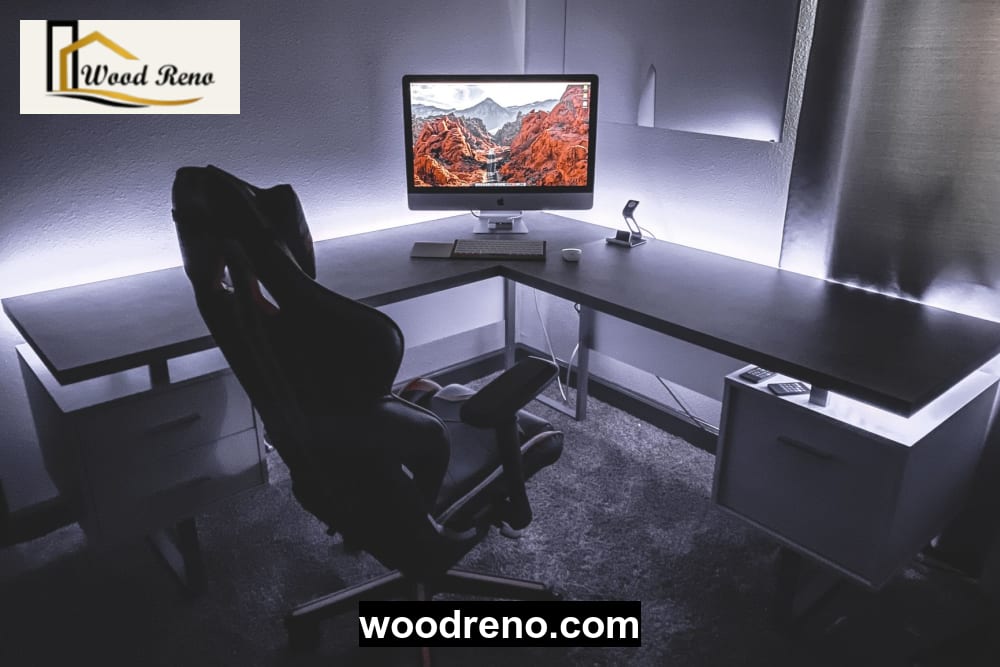
An L-shaped desk makes productive use of a corner while providing two connected work zones. One side can hold the computer and monitors; the return can support paperwork, books, drawing equipment or a printer.
That separation matters. Accounting, design, gaming, study and work-from-home setups often become frustrating when every accessory competes for one narrow surface. An L-shaped workstation spreads the load and can integrate drawers, shelving and cable routes without placing everything directly under the user’s knees.
Is an L-shaped desk worth it? Yes, when you need two work zones and have a suitable corner with adequate chair clearance. A narrow room, frequently rearranged rental home or temporary study area may work better with a straight, compact or modular desk.
Bigger is not automatically better.
Shared family workspaces can use one run for a desktop and the other for supervised study. Gamers gain monitor and speaker space, while office users can keep paperwork separate from the keyboard.
💡 Planning tip: Mark the complete desk outline on the floor with masking tape, then pull the chair back as if standing up. This simple test can reveal blocked cupboards, tight walkways and unsuitable return orientation before ordering.
Popular L-Shaped Computer Table Designs in Pakistan
L-Shaped Desk With Drawers and Side Cabinet
Drawers and a side cabinet keep stationery, files and laptop accessories out of sight. Place the pedestal away from the main knee area and support its base properly; a cabinet should help carry the top rather than hang from weak screws.
Full-extension or reliable ball-bearing runners handle daily use better than cheap slides that bind under weight. Poorly aligned boxes leave scrape marks and uneven gaps.
Minimalist L-Shaped Study Table Design
Students and laptop users often need open legs, shallow shelves and a slim pedestal rather than bulky storage. A compact appearance should not mean a long, unsupported top.
Keep it light, not flimsy.
Readers comparing a corner study desk with a conventional table can review typical study table sizes and prices before deciding how much return space they genuinely need.
L-Shaped Gaming Computer Table Design
A gaming desk needs uninterrupted monitor width, speaker positions, cable channels, a headset hook and ventilated space for the PC tower. Reinforce any point where a monitor arm clamps to the top.
Heavy equipment creates concentrated loads. A dual-screen arm, printer or large desktop case can make an apparently thick board flex if the span, core density and frame support are poor.
Executive L-Shaped Office Desk
Executive desks typically add a broad main surface, integrated return, modesty panel and lockable drawers. They suit paperwork-heavy offices but demand careful room and delivery measurements.
One-piece construction can fail at the staircase.
Wall-Mounted and Compact Corner Desk Designs
Floating surfaces save floor area, yet wall fixings must suit masonry, concrete block, brick or stud construction. Never place a heavy CPU, printer or dual-monitor setup on a wall-mounted top unless suitable structural supports carry the load.
L-Shaped Computer Table With Overhead Shelves
Overhead shelves work well for books and light accessories. Keep their lower edges above head level and clear of monitor sightlines.
Avoid storing heavy objects overhead.
How to Choose the Right L-Shaped Desk Size
For a computer setup, an L-shaped desk should usually be about 28–30 inches (71–76 cm) high and at least 24 inches (60 cm) deep. A 27–30-inch (68–76 cm) depth feels more comfortable for large monitors, dual screens and writing space. Measure chair clearance, door swing and return orientation before ordering.
Those figures are planning ranges, not ergonomic laws. User height, chair adjustment, screen size and working posture change the correct fit. The US Occupational Safety and Health Administration’s computer workstation guidance explains how seating, monitor position and work surfaces should adjust to the individual.
Recommended Dimensions for Study, Office, Gaming and Dual-Monitor Setups
| Setup | Main Desk Length | Return Length | Recommended Depth | Desk Height | Important Note |
|---|---|---|---|---|---|
| Laptop and study use | 42–55 in / 107–140 cm | 30–42 in / 76–107 cm | 20–24 in / 51–60 cm | 28–30 in / 71–76 cm | Preserve open legroom |
| Single-monitor home office | 48–60 in / 122–152 cm | 36–48 in / 91–122 cm | 24–27 in / 60–68 cm | 28–30 in / 71–76 cm | Leave room for keyboard and writing |
| Dual-monitor workstation | 60–72 in / 152–183 cm | 42–60 in / 107–152 cm | 27–30 in / 68–76 cm | 28–30 in / 71–76 cm | Avoid a central pedestal |
| Gaming PC and dual monitors | 60–78 in / 152–198 cm | 48–60 in / 122–152 cm | 27–30 in / 68–76 cm | 28–30 in / 71–76 cm | Reinforce monitor-arm points |
| Executive work and printer setup | 66–84 in / 168–213 cm | 54–72 in / 137–183 cm | 28–32 in / 71–81 cm | 29–30 in / 74–76 cm | Check room and delivery access |
Treat these as practical ranges. Monitor size, chair adjustment, user stature and room constraints may require different dimensions.
Usable legroom should generally remain around 24–30 inches (60–76 cm) wide, without a drawer pedestal pressing against the user’s knees. Dual-monitor users benefit most from a wide, clear main run.
Left-Hand vs Right-Hand L-Shape Desk Orientation
Sit at the main working position and face the desk. A return extending to your left is a left-return desk; one extending to your right is a right-return desk.
Confirm that viewpoint in writing. Product photographs can reverse expectations, especially when sellers describe orientation from the front.
Place the return near the equipment or paperwork you reach most often, but check sockets, printer access, door swing and walking routes first. Workshop teams should confirm the seated viewpoint before preparing the cut list.

How to Measure Your Room Before Ordering
Record:
- Both wall-to-wall corner dimensions
- Skirting-board projection and window-sill height
- Sockets, switchboards and cable routes
- Door and cupboard swing
- AC units, radiators, damp areas or leaking windows
- At least 30–36 inches (76–91 cm) behind the chair where possible
- Staircase turns, lift dimensions, doors and hallway width
Mark the footprint with masking tape or newspaper. Then place the chair inside it and imitate normal movement.
Where to Place an L-Shaped Computer Table in a Room
Choose a quiet corner with nearby power and controlled daylight. Avoid facing a bright window directly or putting harsh daylight behind the monitor, as both positions encourage glare.
Keep timber and engineered board away from persistent dampness. Moisture often attacks cable holes, corners and poorly sealed edges first.
Storage, Drawers and Cable Management Features to Consider
Useful storage supports the workflow; decorative storage merely consumes legroom. Compare drawers, open shelves, side cabinets, printer shelves, keyboard trays, CPU bays and overhead units against what you use every day.
A keyboard tray can free surface area, but it must remain wide, rigid and comfortable. Many users work better with the keyboard on the main top.
Plan sockets before cabinets. Tight CPU cupboards trap heat and dust, so provide open or ventilated space around a desktop tower. Cable grommets, rear channels, under-desk trays and removable access panels keep plugs reachable without leaving wires hanging against the user’s legs.
Drawer placement should reflect hand dominance and seated position. Ideas from smart internal storage layouts can also help when planning divided stationery drawers or adjustable shelves.
Hardware affects both cost and lifespan. Cheap runners can bind; loose screws enlarge holes in low-density board; misaligned drawer boxes rub. Buyers comparing runners, handles and fittings may also consult current cabinet hardware prices in Pakistan.
Best L-Shaped Computer Table Materials in Pakistan
MDF, Laminated Board and Particle Board Comparison
MDF offers a smooth face for paint or laminate and can suit an economical indoor desk. Standing water, chipped corners and unsealed cut edges remain its main weaknesses.
Quality laminated board offers practical scratch resistance and easy cleaning. Core density, laminate adhesion, edge banding and hardware matter as much as the label.
Particle board usually costs less but tolerates repeated dismantling, moisture and stripped screw holes poorly. The span, core grade, thickness and construction method all affect performance.
Solid Wood and Veneer Options for Premium Desks
Responsibly sourced solid wood provides good repairability. Scratches can often be sanded, worn finishes renewed and loose joints tightened.
Broad surfaces need experienced joinery because wood moves as humidity changes. Veneer over a stable substrate can create a natural wood appearance while controlling cost and movement.
Metal Frame and Wooden Top Combinations
A rigid, level and corrosion-protected metal frame can support long spans and suit modern interiors. Adequate cross-bracing matters; four slender legs alone do little to stop side-to-side wobble.
Pair the frame with a sufficiently robust top and reinforce monitor-arm positions.
Why Edge Banding, Joints and Back Panels Affect Durability
Board thickness alone never guarantees strength. Span length, core density, back panels, fixing method and frame reinforcement all influence sag and wobble.
Sealed edge banding protects vulnerable cuts around corners and cable openings. Appropriate pilot holes reduce splitting, while dowels, confirmat fittings, brackets and sound cabinet backs help hold the desk square. For broader joinery principles, Fine Woodworking provides useful technical references on furniture construction.
| Option | Best For | Durability | Eco-Rating | Skill Level | Woodreno Verdict |
|---|---|---|---|---|---|
| Quality laminated board | Budget home offices | Moderate with sealed edges | Depends on core and sourcing | Intermediate | Practical when properly supported |
| MDF | Painted or smooth laminated desks | Moderate; moisture-sensitive | Depends on sourcing and finish | Intermediate | Good finish; protect every edge |
| Particle board | Light, temporary use | Low to moderate | Variable | Basic–intermediate | Avoid repeated dismantling |
| Solid wood | Repairable premium desks | High with sound joinery | Strong when responsibly sourced | Advanced | Best long-term repair potential |
| Veneer on stable substrate | Premium wood appearance | Moderate to high | Depends on substrate and veneer | Advanced | Balanced cost and appearance |
| Metal frame with wood top | Gaming and long spans | High when braced | Depends on both materials | Advanced | Excellent if rigid and corrosion-protected |
Workshop Tips: How a Durable Corner Computer Table Is Built

A sound build starts with confirmed dimensions and orientation. The workshop then prepares a cut list, inspects material, finishes exposed edges and dry-fits the components before drilling permanent fixings.
Corner support deserves attention. The joint where both runs meet needs a cabinet base, leg, bracket or reinforced frame beneath it. Long unsupported tops can sag under monitors and printers even when the board looks substantial.
Hardware follows levelling. Installing drawers before checking the tabletop can leave uneven reveals and rubbing fronts. Poor alignment is often visible through crooked shadow lines around drawer fronts and cabinet edges.
Monitor arms and printers require local reinforcement. A desktop tower should sit on a supported, ventilated shelf rather than a thin hanging panel.
Pre-Delivery Inspection Checklist
- Stable legs with no rocking
- Level, adequately supported top
- Smooth drawers with even gaps
- Sealed edges and no sharp corners
- Aligned laminate or veneer
- Tested cable openings
- Reinforced equipment positions
- Modular parts labelled for assembly
L-Shaped Computer Table Price in Pakistan
Final cost changes with size, core material, timber grade, tabletop thickness, drawers, runners, handles, finish, metalwork, cable accessories, delivery and installation. Custom site conditions can change it again.
No responsible workshop can quote accurately from a photograph alone.
Prices should be confirmed directly with Woodreno before ordering because material rates, hardware costs, delivery requirements and custom dimensions can change. Woodreno’s broader guide to computer table prices in Pakistan provides additional comparison context.
L-Shaped Computer Table Options in Pakistan
| Desk Type | Ideal Room Size | Typical Dimensions | Suitable Setup | Storage Level | Common Materials | Durability and Repairability | Indicative Price Position |
|---|---|---|---|---|---|---|---|
| Compact study desk | Small | 42–55 × 30–42 in / 107–140 × 76–107 cm | Laptop or study | Low | Laminated board, MDF | Moderate | Budget |
| Desk with drawers | Small–medium | 48–66 × 42–54 in / 122–168 × 107–137 cm | Home office | Medium–high | Laminated board, MDF, veneer | Moderate | Budget to mid-range |
| Gaming desk | Medium | 60–78 × 48–60 in / 152–198 × 122–152 cm | Dual monitors and PC | Low–medium | Board top, wood, metal frame | Moderate–high | Mid-range to higher-spec |
| Executive desk | Large | 66–84 × 54–72 in / 168–213 × 137–183 cm | Office, printer, paperwork | High | Veneer, engineered board, wood | Moderate–high | Higher-spec |
| Custom solid-wood desk | Measured to room | Project-specific | Long-term home or office use | Custom | Solid wood or wood-and-metal | High repairability | Premium custom |
All price positions are indicative. City, material grade, hardware, finish, installation and custom dimensions affect quotations.
What Drives the Price of an L-Shaped Computer Table?
| Cost Factor | Budget Option | Higher-Spec Option | Effect on Price and Longevity |
|---|---|---|---|
| Core material | Basic particle board | Dense board, veneer or solid wood | Better cores hold fixings longer |
| Tabletop thickness | Thin, short supported top | Thicker or reinforced long top | Reduces flex when properly supported |
| Finish | Basic laminate | Premium laminate, veneer or durable coating | Affects wear and moisture resistance |
| Runners and handles | Basic hardware | Reliable full-extension hardware | Improves loaded drawer operation |
| Drawers or cabinets | Open design | Multiple fitted storage units | Adds material, labour and weight |
| Metal reinforcement | None or minimal | Braced, corrosion-protected frame | Improves long-span stability |
| Cable management | Basic hole | Grommets, trays and access panels | Improves serviceability |
| Delivery and installation | Flat-packed collection | Modular delivery and installation | Adds cost but reduces access risk |
A low initial quote may omit reliable runners, back support, sealed edges or assembly. Ask what the figure includes.
Custom-Made vs Ready-Made L-Shaped Computer Tables
Ready-made desks offer speed and a predictable listed cost. Modular models also move more easily through apartment stairs.
Custom work earns its value when the corner, return side, storage arrangement or finish demands a precise fit. A quote should identify dimensions, material, thickness, hardware, finish, delivery and installation separately where applicable.
Provide the workshop with:
- Exact corner dimensions
- Left- or right-return orientation
- Main seated position and chair clearance
- Monitor count and arm locations
- CPU and printer positions
- Drawer side and socket locations
- Approved finish sample
- Stair, lift and